
The professional platform to manage remote speakers.
Invitations, technical rehearsals, Green Room, vMix Calls and live operation from a single platform.
Compatible with vMix.
Designed for operators. Invisible for speakers.
Expected launch: Q4 2026
The Speaker Journey
Every remote speaker follows the same journey — StreamCUE Speakers manages every step automatically, before, during and after your live production.
- Invitation
- Technical Rehearsal
- Diagnostics
- Green Room
- vMix Call
- ON AIR
- Wrap-up
One invitation. One link. Complete control.
Every speaker uses the same secure link from invitation to live production.
Invite once. Rehearse. Wait. Go live. Return later — always with the same secure link.
A single invitation
Invite the speaker just once for the entire event.
Permanent link
The same secure link for rehearsals, Green Room and live broadcast.
Unlimited rehearsals
Run all the technical tests you need before the event.
Live sessions
Join every segment of the event without creating new access links.
A single platform.
Everything under control.
Invitations, rehearsals, diagnostics, Green Room and live operation in one place.
Built for real live productions.
Everything the operator needs. Nothing extra for the speaker.
Before, during and after every live production — while each speaker only ever sees one simple link.
Invitations & one permanent link
Invite each speaker once. They get a single secure, permanent link they keep for every rehearsal and the live show — no resending, no last-minute changes.
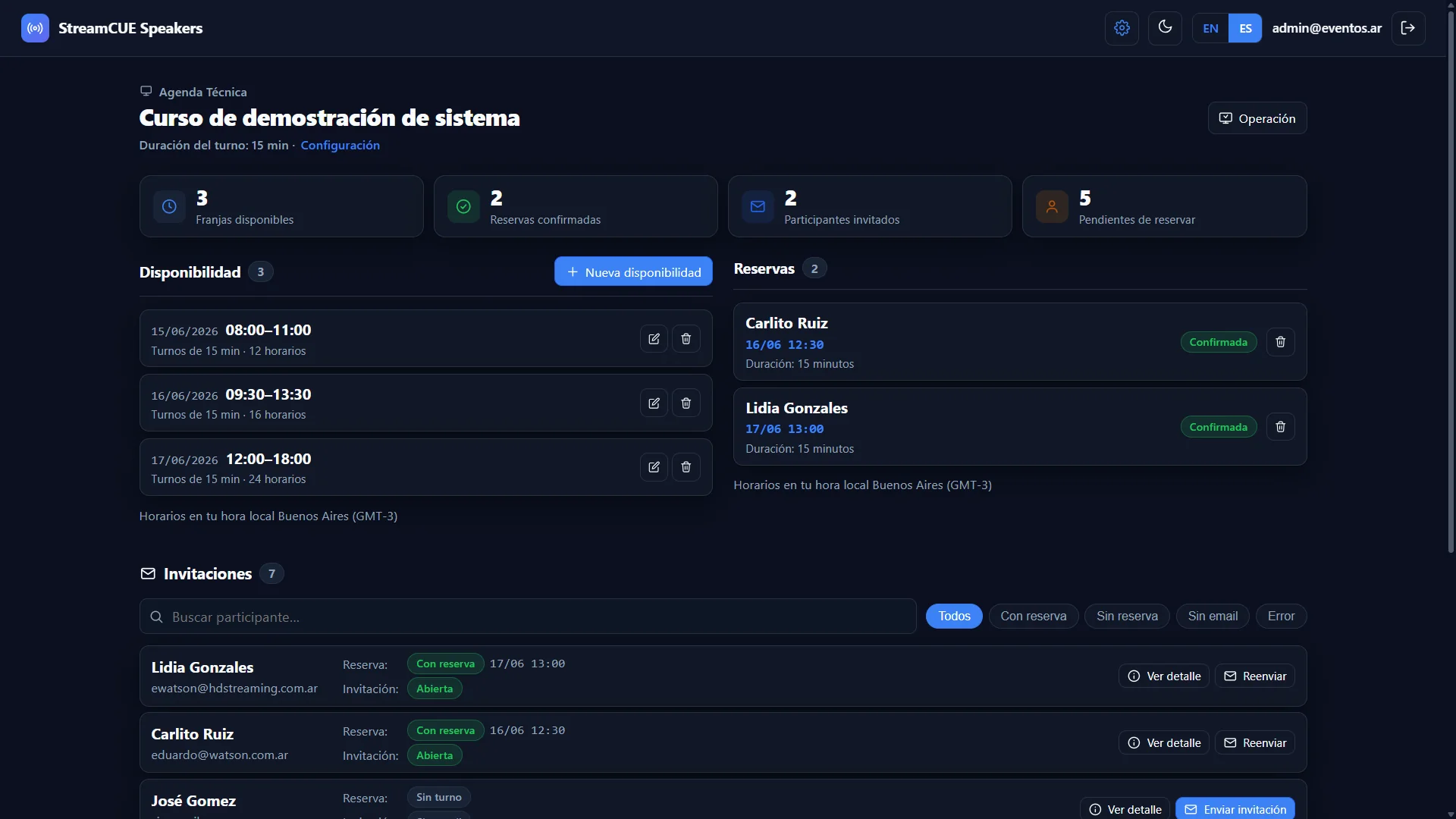
Technical rehearsals
Never start a live event without a rehearsal. Run unlimited test sessions to check camera, mic, screen share and the vMix Call — and catch problems before your audience does.
Automatic emails
Invitations, reminders and schedule details sent automatically, each in the speaker's own timezone. No spreadsheets, no manual follow-up.
Pre-event diagnostics
See each speaker's browser, OS, screen, camera and connection before they go live, so you fix issues early instead of on air.
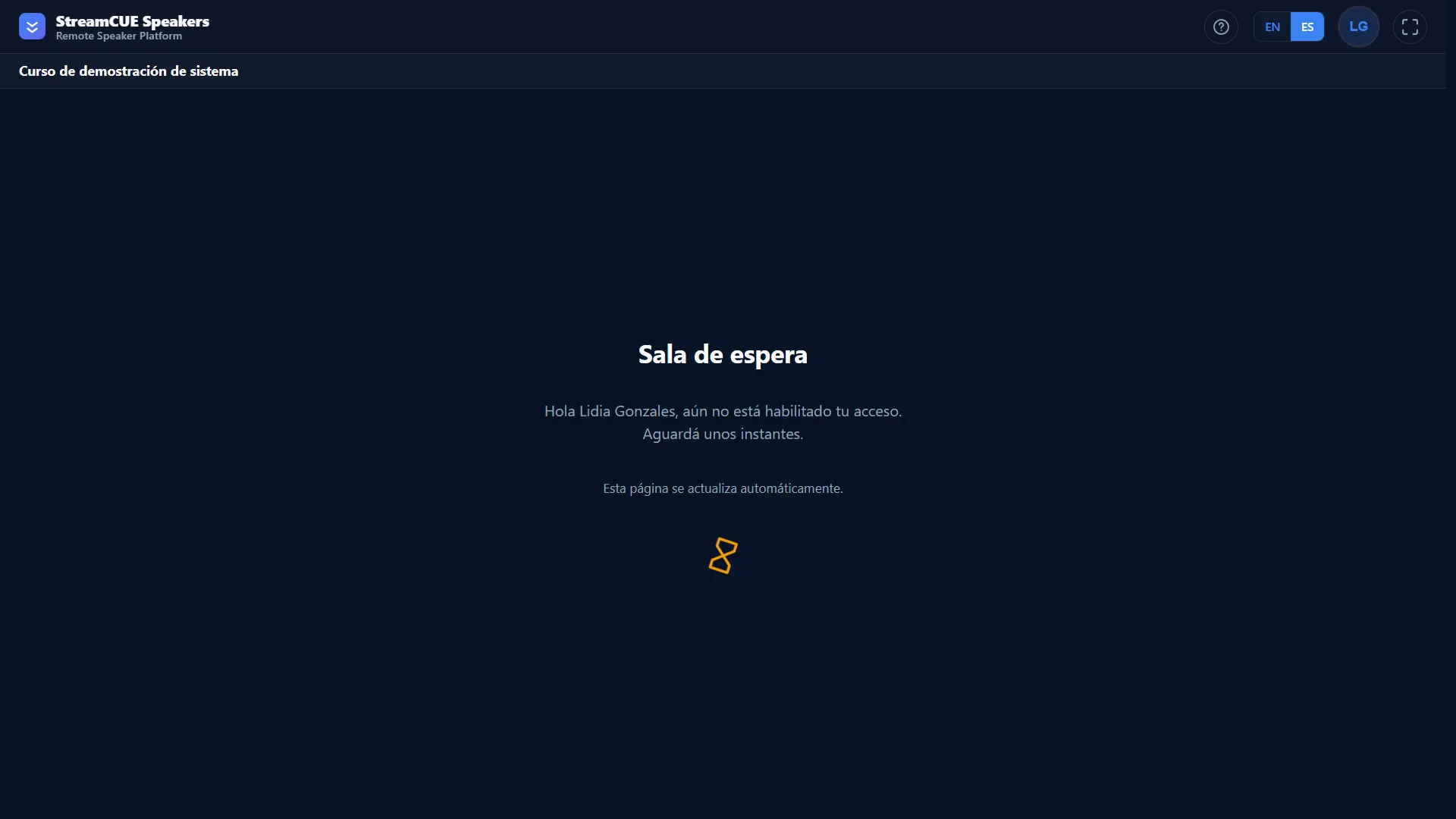
Personal Green Room
Each speaker waits in their own private room with operator-controlled access and screen share when you need it. The Green Room is one stage, not the whole product.
Program return & live updates
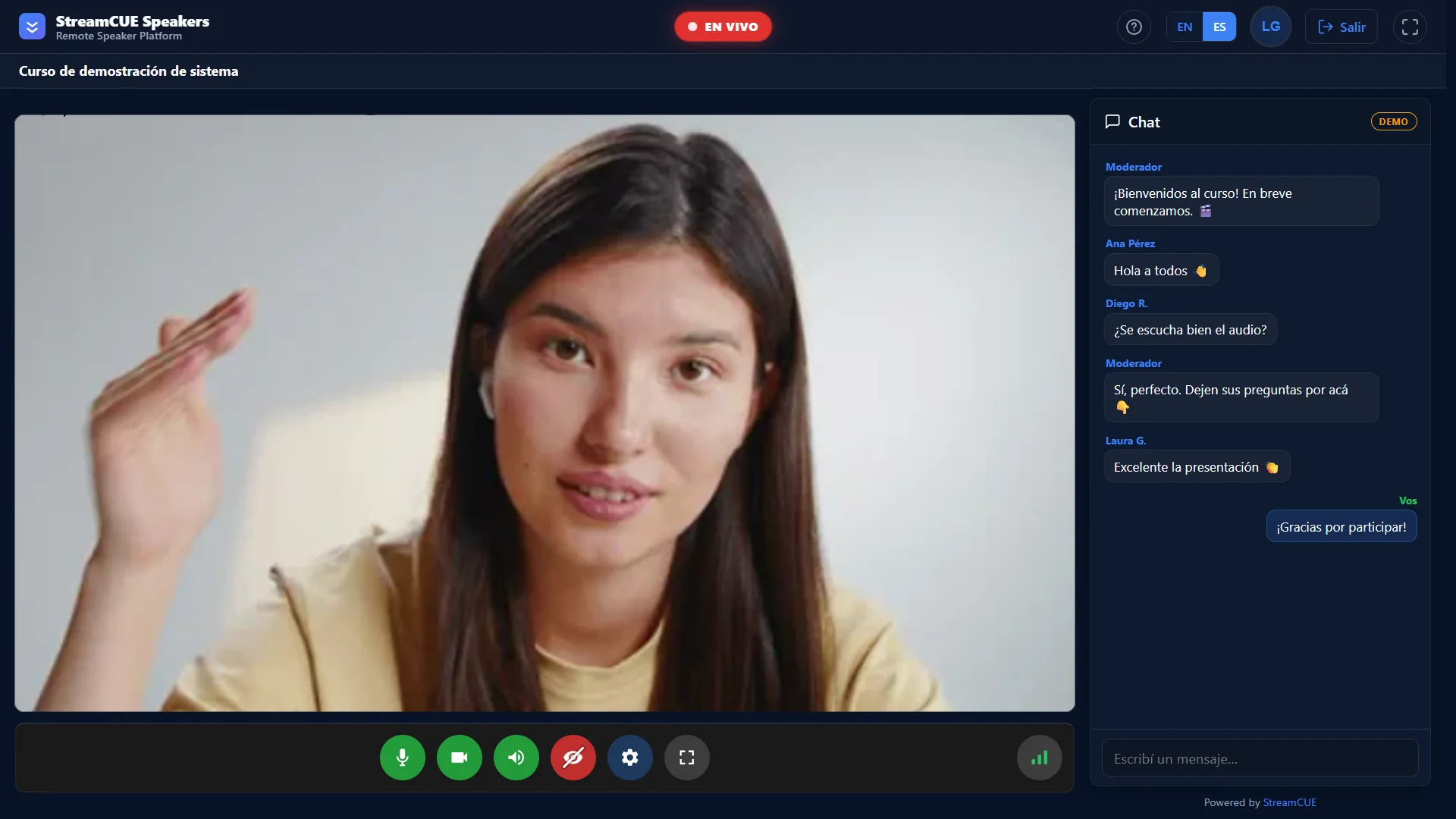
While they wait, they stay connected: program return, operator messages, live updates, instructions and a countdown. No one sits in silence wondering what comes next.
Real-time speaker status
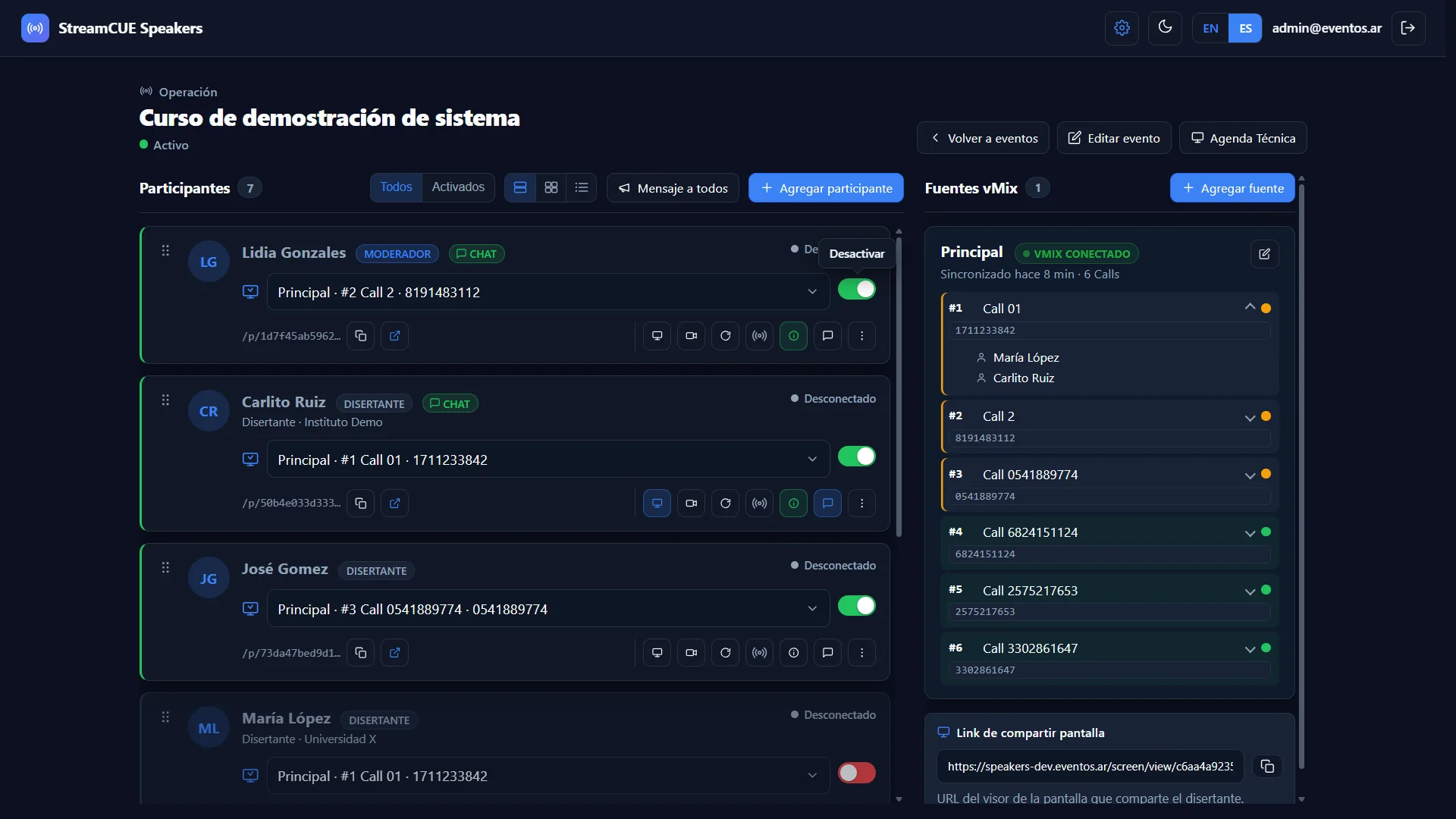
See who is online, in preview or live at a glance — grouped by status, with presence indicators — so you always know exactly who is ready.
Flexible vMix Call assignment
Assign or reassign any speaker to a different vMix Call — even on another vMix PC — without sending a new invitation or link.
ON AIR / Preview Tally
On Air, Preview and Standby signals reach the speaker's screen in under a second, straight from vMix. They always know when they are live.
Operator messaging
Send a private message to any participant from the console. It appears on their screen instantly — no phone call, no email, no interruption to the show.
Wrap-up & close participation
Cleanly end a speaker's session when they are done, freeing the vMix Call and keeping the console tidy through long events.
Session history & diagnostics
A record of who connected, from which device, and any issues during the event — useful for review and for improving the next production.
Follow-up
Keep each speaker's details to follow up after the event and invite them back — always to the same permanent link.
Operator setup in five steps
Get your production ready fast — add speakers, connect vMix and go live. The agent handles the rest.
Add your speakers
Import or add presenters manually. Each gets a unique personal link and their own waiting room.
Connect a vMix source
The StreamCUE agent runs on the vMix PC and syncs Calls passwords automatically via Web API and TCP API.
Speaker opens their link
A unique URL, browser only. The 16-step onboarding walks them through camera, mic and screen share in minutes.
Operator activates
One toggle per speaker from the control panel. Enable access when ready, disable between segments. Broadcast messages to all.
Live Tally keeps everyone in sync
On Air · Preview · Standby — delivered instantly to the speaker's screen from the vMix agent. No guesswork.
The Green Room, reinvented
One screen. Every participant. Full situational awareness for the operator — without leaving the panel.
Every speaker.
One screen.
Zero surprises.
Live Control is the operator's command center. All participants are visible in real time, grouped by status, with live presence indicators and device diagnostics. No reloads. No blind spots.
-
Real-time presence — online, unstable or offline based on the last browser ping. Spot connection problems before they become problems on air.
-
Grouped by status — Live · Ready · Waiting · Standby · Finished · Offline. Filter, search and act on any group without reloading the page.
-
Device diagnostics — browser, OS, IP address, screen resolution and monitor count per speaker. Troubleshoot remotely without a phone call.
-
Instant actions — enable entry, change status, send a message, force reload or restart a vMix Call — all from the same view, instantly.
Automated. Reliable.
No manual scripting.
A lightweight StreamCUE agent runs on the vMix PC. Once started, it handles everything — no operator needs to touch it during the production.
- 1 Paste and run. The agent script is generated by StreamCUE Speakers and pasted into vMix or run directly from PowerShell. No additional software required.
- 2 vMix Web API (HTTP 8088). The agent queries the local API to discover active vMix Calls and their current state.
- 3 vMix TCP API (8099). Real-time events from vMix — Tally changes, input switching — are pushed directly to the agent via TCP.
- 4 Automatic Calls sync. Passwords are imported into each speaker's room without copy-paste. If vMix changes a Call, the room updates.
- 5 Tally to the browser. On Air · Preview · Standby signals reach the speaker's screen in under one second from the vMix event.
Production Console
You get a console, not just a room. See exactly what the operator controls — and what each speaker sees on the other side.
Built for teams that run live events
If you manage remote speakers in any capacity, StreamCUE Speakers removes the operational overhead.
vMix production companies
You already use vMix. StreamCUE Speakers plugs in via the existing API — no new infrastructure needed.
Conference & congress organizers
Manage dozens of speakers across time slots and sessions from a single operator view.
International & hybrid events
Remote speakers in different countries, different timezones. The platform handles conversions automatically.
Corporate broadcast teams
Internal town halls, product launches, all-hands. Keep executives and remote presenters in sync without a dedicated tech team per speaker.
Simple pricing for live productions
From small events to broadcast productions. Choose the plan that best fits your operation.
Every plan includes the native WebRTC speaker room, vMix integration and operator dashboard.
Ideal for webinars
Starter
Ideal for small events and webinars.
Billed annually.
- 1 active event
- Up to 25 participants
- Up to 2 vMix sources
- Native WebRTC mode
- Participant room
- Operator panel
- WhatsApp integration
- Basic metrics
- 1 admin user
- StreamCUE branding
No credit card required
Ideal for conferences
Professional
Ideal for congresses, universities and production companies.
Billed annually.
- Up to 5 active events
- Up to 100 participants per event
- Up to 5 vMix sources
- Screen sharing
- Technical rehearsals
- Automated communications
- Full metrics
- Per-event branding
- Up to 3 admins
- Priority support
No credit card required
Ideal for production companies
Broadcast
Built for broadcasters and agencies.
Billed annually.
- Unlimited events
- Unlimited participants
- Unlimited vMix sources
- Full White Label
- Managed TURN infrastructure
- Metrics history
- API
- Unlimited users
- SLA
No credit card required
Custom deployments
Enterprise
Custom solution.
For organizations with specific needs.
Custom solutions for large organizations, integrations, dedicated deployments and special requirements.
Personalized onboarding
Why StreamCUE Speakers?
Not another video-call tool. Built specifically for live productions running on vMix.
- Native WebRTC room
- Built specifically for vMix productions
- Technical rehearsal scheduler
- Live operator dashboard
- Real-time speaker status
- Native screen sharing
- No software installation
- Automatic reconnection
- Built for professional live events
Frequently asked questions
StreamCUE Speakers is a speaker management platform for live events, conferences and hybrid productions. It gives each speaker a personal waiting room accessed via a unique browser URL, and integrates natively with vMix for automatic Calls sync and real-time Tally signals. No app to install, no account to create for speakers. It lives at speakers.eventos.ar.
StreamCUE Speakers manages and controls vMix Calls automatically. A StreamCUE agent runs on the vMix PC. It uses the vMix Web API (HTTP port 8088) to discover active Calls and imports their passwords into each speaker's room automatically. It also listens to the TCP API (port 8099) for real-time events — Tally changes, input switching — and forwards them to the speaker's browser in under one second. No manual copy-paste, no scripting knowledge required from the operator.
Yes. The scheduling system automatically converts every time slot to the speaker's local timezone. A speaker in Tokyo and a speaker in London both see their call time in their own timezone — no mental math, no missed sessions. It works for any number of timezones simultaneously.
Just a modern browser — Chrome, Firefox, Edge or Safari. Speakers receive their unique personal URL. A 16-step onboarding tutorial guides first-time speakers through every control: camera, microphone, vMix Call connection and screen sharing. There is nothing to install, no account to create and no password to remember.
Less coordination. More production.
One invitation, one permanent link, and the entire remote speaker management handled for you. Focus on the show.